A voice call is the most demanding thing an AI companion does. Text can take a few seconds without anyone minding. Speech cannot: people notice delays that would be invisible in a chat window.
The 200-millisecond problem
Researchers who compared conversations across ten languages found the typical gap between one person finishing and the other starting is around 200 milliseconds - and it is remarkably similar across cultures. People start planning their reply before the other person finishes. Gaps much longer than that read as hesitation, confusion or disinterest.
An AI has to fit a whole pipeline into roughly that window to feel natural.
What happens between your words and hers
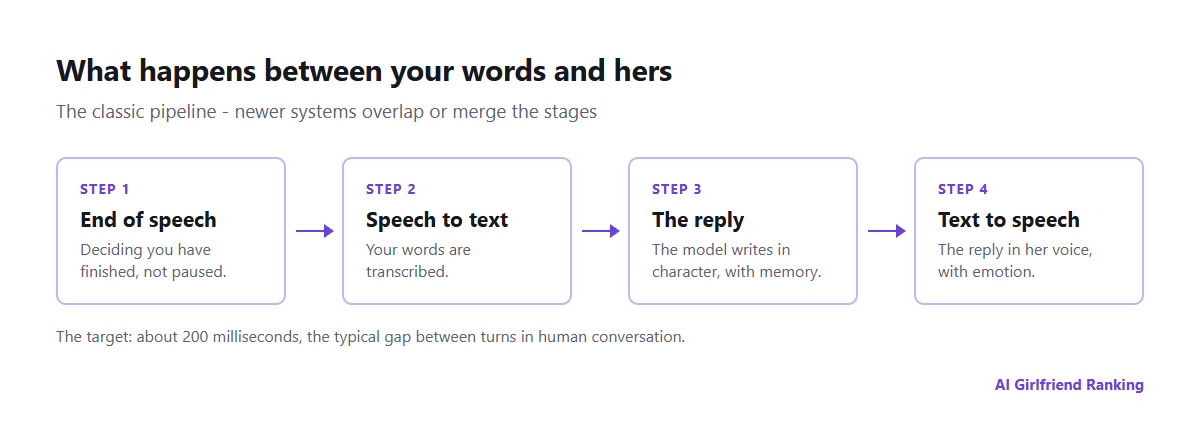
The classic pipeline. Newer systems overlap or merge these stages.
- End-of-speech detection. The system has to decide you have finished, not just paused. Too eager and it interrupts you; too cautious and it adds dead air.
- Speech to text. Your words are transcribed.
- The reply. The language model writes a response, in character, with memory.
- Text to speech. The reply is turned into a voice - ideally the character's own, with emotion.
In older systems each step waits for the previous one to finish. Newer ones start speaking the first sentence while the rest is still being written, or use models that take speech in and produce speech out directly, which removes the transcription and synthesis steps altogether.
Why voice is metered
| Text chat | Voice message | Live voice call | |
|---|---|---|---|
| Speed needed | Seconds are fine | Seconds are fine | Fractions of a second |
| Extra processing | None | Speech synthesis | Recognition, synthesis, turn detection |
| Typical length | Short replies | One reply | Minutes to hours |
| Relative cost | Lowest | Moderate | Highest |
| How apps sell it | Included | Included or credits | Minutes, tiers or credits |
Every minute of a call runs the whole pipeline continuously, often on more expensive "real-time" versions of each model. That is why voice is usually the first thing an app caps, and why "unlimited" rarely applies to it - see reading AI girlfriend feature lists.
What makes a call feel real
- Low latency, consistently. An occasional long pause breaks the illusion more than a slightly slower average.
- Interruption handling. Being able to cut in, and having her stop and respond, is what separates a conversation from alternating voice notes.
- Voice consistency. The same voice, accent and warmth across calls. Our testers found voice quality can vary noticeably between characters even in good apps.
- Prosody. Laughing, pausing, softening - speech that carries emotion rather than reading text aloud.
- Memory in voice mode. Some apps use a lighter model for calls, so the character remembers less on the phone than in chat.
Testing a voice feature before you pay
- Ask what is included: voice messages, live calls, or both - and how many minutes.
- Make a two-minute call on a trial or the cheapest plan, on mobile data as well as Wi-Fi.
- Interrupt her mid-sentence. Does she stop?
- Ask about something from your text chat. Does she know it?
- Check the cost per extra minute or credit. A long call can use a month's allowance.
The broader point about media costs is in how AI girlfriend images and voice work, and whether upgrading for voice is worth it is covered in premium tiers.
A note on wellbeing
Voice is more immersive than text, and the 2025 OpenAI and MIT research found that brief voice use went with better wellbeing while heavy daily use did not. It is worth enjoying in doses - the signs of too much are in when an AI companion starts taking more than it gives.